Trip Changes & Ticket Refunds
- Home
- /
-
Trip Changes & Ticket Refunds
Trip Changes (Rescheduling)
Rescheduling or changing travel details can be checked on the trip details page before booking.
How to know if rescheduling is available
- A check mark (✓) means rescheduling is available
- A cross (✕) means rescheduling is not available
- If available, click the (!) icon to view conditions such as the minimum hours required before departure
How to reschedule after booking
- Go to “Manage Booking”
- Select the booking you want to change
- Click “Reschedule Ticket”
- Follow the steps shown on the screen
Note
If your booking does not meet the conditions, the reschedule button will be disabled and you will not be able to proceed.
Ticket Refunds
Refund eligibility is similar to rescheduling. You can check the conditions via the (!) icon in the trip details.
How to request a refund
- Go to “Manage Booking”
- Select the booking you want to refund
- Click “Request Refund”
- Fill in the required information
- Review the policy and confirm your request
Fees and refund timeline
- A refund fee applies to every refund request
- Fees vary by bus operator
- The system will show the estimated business days to receive your refund before confirmation
Important Notes
- Not all trips support rescheduling or refunds
- Conditions and fees depend on the bus operator
- Please review the trip details before submitting any request
Illustrative Examples

Example of reschedulable/refundable ticket (Check Mark)

Example of non-reschedulable/non-refundable ticket (Cross Mark)
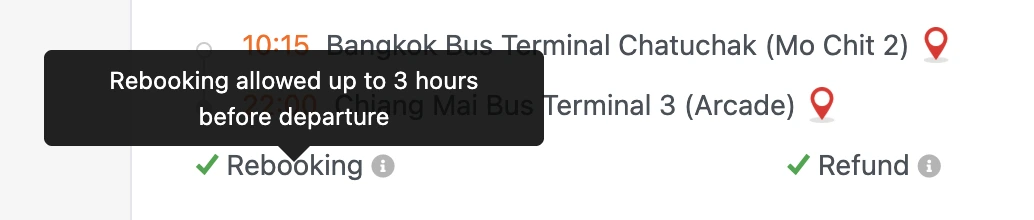
Example of rescheduling/refund conditions icon (! Mark)